

Static Code Analysis
On this page
Static Code Analysis
Static analysis tools inspect the source code of your applications, looking for known issues. The tools use a database of issues which can include poor coding practices, code which is difficult to maintain, and known security problems. SonarQube is one of the most popular analysers. It supports multiple languages with databases which include best practices and CVEs.
There are commercial versions of SonarQube but we'll run the free community edition. It runs as a server, and you can trigger the analysis when you build your code. A SonarQube client on your desktop or build server sends the code for analysis and prints the results. Any issues are stored in the SonarQube server, and you can configure critical issues to fail the build.
Reference
Run Sonarqube
Start by running SonarQube - this Docker Compose file uses the official image on Docker Hub, and publishes to port 9000 on your machine:
docker compose -f labs/static-analysis/infra/docker-compose.yml up -dSonarQube can take a minute or two to spin up. When the container is running, log in to the web UI at http://localhost:9000 using System Administrator credentials:
- login:
admin - password:
admin
It will ask you to set a new password - anything that isn't admin will do.
⚠️ The container runs SonarQube 26 (the upstream lab was written for 9.2). The concepts are unchanged but some screens have moved - the project creation wizard in particular. Where the steps below don't match what you see, the labels in the UI are close enough to follow; the SonarQube docs are authoritative.
This is a new SonarQube server with no projects set up, but you can browse the rules it uses.
📋 Can you find some security vulnerability checks for .NET apps?
Not sure how?
The coding rules in the UI show helpful documentation for all the rules:
- http://localhost:9000/coding_rules - coding rules for multiple languages and analysis types
- http://localhost:9000/coding_rules?languages=cs&types=VULNERABILITY - security vulnerabilities for C# apps
- http://localhost:9000/coding_rules?languages=cs&open=csharpsquid%3AS5445&types=VULNERABILITY - a known OWASP vulnerability for C#
Just browsing the rules for your language can help you write better and more secure code 🙂
Create a SonarQube Project
We'll create a new project we can use to analyse some .NET Code.
Browse to http://localhost:9000/projects/create and configure the new project:
- choose the option to create a local project (SonarQube can integrate
with GitHub, GitLab and others; we're setting this one up by hand)
- set the Project key (and display name) to
hello-world-cs
- when asked about the baseline for new code, the global setting is fine
- choose to analyse the project locally and generate a token - call it
anything, e.g.
devops
- SonarQube displays the token - we'll use this later for authentication, so copy the token (it looks like
d19405a6925267bbcd52221c407bc01c2010c82bbut yours will be different)
- click Continue
- choose .NET for the application type, then .NET Core
The project UI shows you how you can run a local build and have your source analysed in the SonarQube server.
Run Analysis in Docker Build
We'll run our local build using Docker, so we don't need to install any SDKs.
Start by saving your SonarQube token in a variable in your terminal session (if you don't have it, you can create a new one from your security page).
Be sure to use your actual token in this command:
# on macOS or Linux:
SONAR_TOKEN='<your-token>'

# or on Windows PowerShell:
$SONAR_TOKEN='<your-token>'
Now we can pass the token as a build argument for this .NET Dockerfile:
- this builds a simple Hello World app, with optional SonarQube analysis
- the build runs inside Docker, so we can access SonarQube via the host using the special
host.docker.internaladdress
- you'll see the
dotnet sonarscannercommands in the Dockerfile, which are the same ones SonarQube printed on the project page
docker build -t hello-world-cs --build-arg SONAR_TOKEN=$SONAR_TOKEN ./labs/static-analysis/hello-world-cs

# if you're using Linux then the `host.docker.internal` address may not be set -
# you can run this instead. The legacy builder is needed here because
# 'docker build --network' is a classic-builder flag; expect a deprecation
# warning:
export DOCKER_BUILDKIT=0

docker build -t hello-world-cs --build-arg SONAR_TOKEN=$SONAR_TOKEN --build-arg SONAR_URL=http://sonarqube:9000 --network infra_default ./labs/static-analysis/hello-world-cs
When the build completes, it sends the results to the SonarQube server where they get stored for the project.
📋 Check the project in SonarQube - how does it look?
Not sure?
You can see all the details in the UI:
- overall project status - http://localhost:9000/dashboard?id=hello-world-cs
- issues - http://localhost:9000/project/issues?id=hello-world-cs&resolved=false
- security hotspots - http://localhost:9000/security_hotspots?id=hello-world-cs
Failing Builds with Quality Gates
There are a few issues with the project. Ideally we want the build to fail if there are significant security issues. We can do that by setting a quality gate. The gate specifies the conditions the project needs to meet for it to pass analysis.
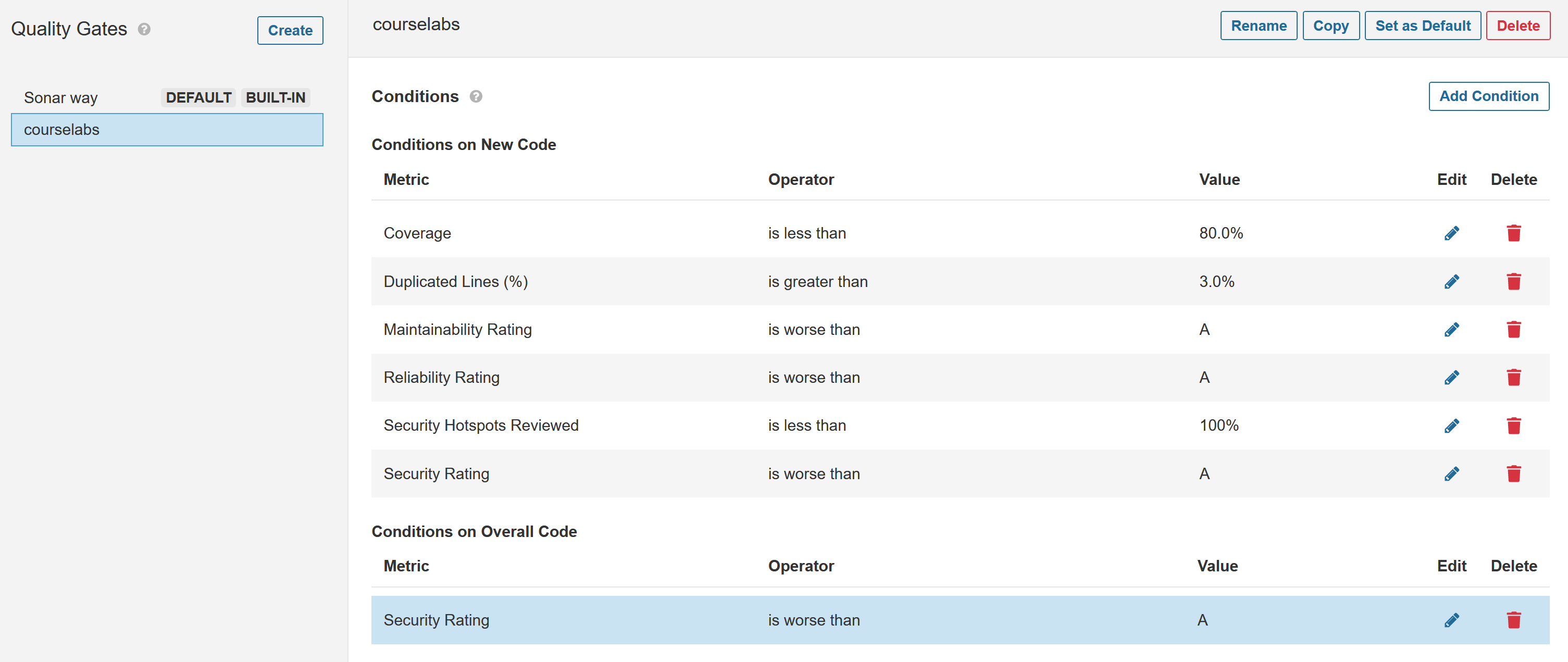
Browse to http://localhost:9000/quality_gates/. You'll see a default gate already there called Sonar way. This only operates on new code - changes which have been made since the previous analysis. We want a quality gate which runs on all code:
- click Copy to copy the default gate
- call the new gate
courselabs - click Add Condition
- select to run On Overall Code
- in the dropdown choose Security Rating
- for the operator select worse than A
- click Add Condition
Your new quality gate should look like this:
Now we can set the .NET project to use that quality gate, and the analysis will fail if the overall security rating is too low.
- browse back to the project at http://localhost:9000/dashboard?id=hello-world-cs
- click Project Settings dropdown in top-right and select Quality Gate
- select Always use a Specific Quality Gate and select your new
courselabsgate
The build arguments in the Dockerfile allow you to set whether a failed analysis check should fail the build.
📋 Run the Docker build so it fails if the SonarQube check fails.
Not sure how?
The argument to set is called SONAR_ENFORCE_GATE.
With Docker Desktop:
docker build -t hello-world-cs --build-arg SONAR_TOKEN=$SONAR_TOKEN --build-arg SONAR_ENFORCE_GATE=true ./labs/static-analysis/hello-world-csOr with Docker Engine on Linux:
export DOCKER_BUILDKIT=0

docker build -t hello-world-cs --build-arg SONAR_TOKEN=$SONAR_TOKEN --build-arg SONAR_ENFORCE_GATE=true --build-arg SONAR_URL=http://sonarqube:9000 --network infra_default ./labs/static-analysis/hello-world-cs
Now the build fails. If the Dockerfile included a unit test stage, it would run after analysis and it would also fail if any tests failed. That means if we have an image which was created from the build then it must have passed all the tests and the security analysis.
The downside is that the rules are outside of SCM so you could fetch an old version of the code, build it and not get the same output if the rules have changed.
Lab
Your turn to analyse a project - we'll use a Java version of a Hello World app:
- hello-world-java/Dockerfile - is a multi-stage build which uses Maven. It's configured to run SonarQube using the same set of build args as the .NET app from the exercises
Start by running the build with analysis enabled - you don't need to create a project in SonarQube, it will create the project when the analysis is triggered from Docker. How does the app look? Next set the new project to use your courselabs quality gate and run the build again with checks enforced. Do you get an image this time?
Cleanup
Clean up by removing this lab's containers:
docker compose -f labs/static-analysis/infra/docker-compose.yml downThis removes only the containers this lab started. If you want a clean slate,
docker pswill show anything still running.